

Smart Config: Tagging uses your research question to generate a structured tag hierarchy — the framework Nested Knowledge uses for qualitative data extraction. Where Core Smart Tags is limited to a fixed set of pre-defined concepts (PICOs, Study Type, Location, Size), Smart Config: Tagging generates a fully custom hierarchy tailored to your review and is designed to be paired with Adaptive Smart Tags (ASTs) for AI-assisted extraction across abstracts and full texts.
For rapid and scoping reviews, front-loading the data extraction template is often the single biggest time saver. Smart Config compresses what is typically a multi-day setup activity into a single research-question prompt, producing a draft hierarchy that can be reviewed and refined before any AI extraction is triggered. This is the recommended starting point when approaching data extraction of included studies from a blank hierarchy.
Generating a tag hierarchy with Smart Config #
Step 1. Open the Configure Tag Hierarchy page #
In your nest, hover over the left-hand menu and click the gear icon to the right of Tagging. This opens the Configure Tag Hierarchy page, where you can build, import, edit, and generate the framework that drives qualitative data extraction for your review.
Step 2. Open the Smart Config modal #
At the top of the page, select the Smart Config button (gear and sparkle icon) — to the right of the Core and Adaptive options. The Smart Config modal will open.
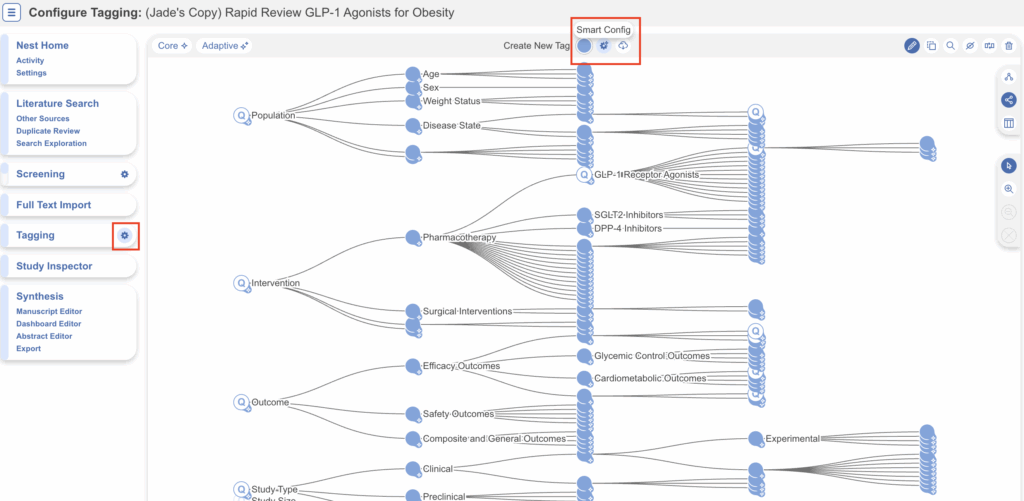
The Configure Tag Hierarchy page. Smart Config is launched via the gear-and-sparkle icon next to the Core and Adaptive Smart Tags controls.
Step 3. Confirm or refine your research question #
If you have already used another AI tool in your nest that requires a research question (e.g. Smart Search, Smart Config: Screening, or Core Smart Tags), the Research Question field will be pre-populated; otherwise, enter your research question directly. You can edit the question freely, or use the Refine button to have AI tighten it before generating the hierarchy.
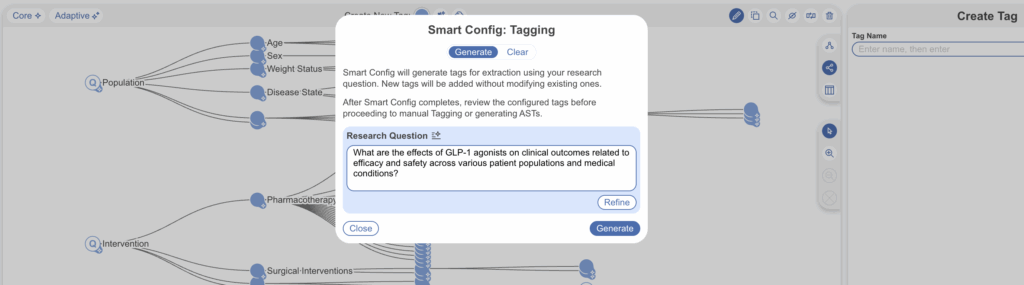
The Smart Config: Tagging modal, with the research question pre-populated and ready to generate.
Step 4. Generate #
Select Generate. Smart Config produces a structured tag hierarchy based on your research question. New tags are added without modifying anything you have already created or imported — so it is safe to run Smart Config more than once, or to combine it with an imported template, Core Smart Tags, or tags you have built manually.
What gets generated: Smart Config produces a multi-level hierarchy of tags grouped under root concepts (e.g. Study design, Outcomes, Intervention). Each generated tag is configured as a Single Apply question type — meaning each study receives one answer per tag. This question type is directly compatible with Smart Insights, which can then be generated across the extracted data once ASTs have run.
Review and edit the generated hierarchy #
Tags are not automatically extracted by Smart Config — this is a key difference from Core Smart Tags. Smart Config only builds the framework. You should review and refine the generated hierarchy before triggering AI extraction with Adaptive Smart Tags.
Typical refinements at this stage include:
- Renaming tags to match your team’s terminology or the language of your extraction template.
- Adjusting the hierarchy — dragging tags into different parents, merging duplicates, or removing tags that are out of scope for your review.
- Editing question text to make the prompt that ASTs will use more specific (e.g. specifying units, expected formats, or constraints).
- Changing the question type if Single Apply is not the right fit — for example, switching to Multiple Apply for tags that may have more than one answer per study.
- Adding child tags to capture sub-concepts the AI did not surface.
For detailed guidance on tag-level configuration (question types, descriptions, aliases, child tags), see Configuring and Editing the Tag Hierarchy and Best Practices for Tagging.
Extracting tag contents with Adaptive Smart Tags #
Once the hierarchy is reviewed, the next step is to populate it with extracted data. This is done by running Adaptive Smart Tags (ASTs) — the AI extraction tool designed to be paired with Smart Config-generated tags. Unlike Core Smart Tags, ASTs work on both abstracts and full texts and support custom questions of any structure.
Run ASTs from the Tag Hierarchy #
ASTs can be triggered for any tag in your hierarchy. When you run ASTs, you can choose between standard mode and High Fidelity mode. High Fidelity is recommended where extraction accuracy matters more than turnaround time — it uses a more thorough extraction pass at the cost of additional processing time.
Review extracted tag contents #
After ASTs have run, extracted tag contents are visible in three places:
- On the Tagging page itself, alongside each study’s abstract or full text.
- In Study Inspector, where you can filter by any tag or tag content and apply bulk actions across the filtered subset.
- Via the Examine tool on the Tag Hierarchy itself, which shows a snapshot of all extracted content for a selected tag and its child tags.
AST outputs should always be reviewed in a human-in-the-loop workflow. Edits made in Study Inspector or on the Tagging page write back to the tag and are reflected in all downstream views and exports.
Generate Smart Insights #
Once ASTs have populated the hierarchy, you can generate Smart Insights — AI-generated narrative summaries built directly from the extracted tag contents. Because Smart Config configures its tags as Single Apply questions, the generated hierarchy is set up to feed cleanly into Smart Insights with no additional reconfiguration.
This is the typical end-to-end flow Smart Config: Tagging is designed for:
Research question → Smart Config (build hierarchy) → Review/edit tags → Adaptive Smart Tags (extract) → Review in Study Inspector → Smart Insights
Why Smart Config matters for rapid and scoping reviews #
Designing a data extraction template is one of the most labour-intensive setup steps in any review, and rapid or scoping projects compress this into a fraction of the usual timeline. Smart Config front-loads the work: from a single research question, you get a draft hierarchy in seconds, ready to refine. Pairing Smart Config with Adaptive Smart Tags turns what is conventionally a weeks-long extraction phase into something measured in days, without losing the structure or traceability of a manually configured template.