

A systematic review doesn’t only gather evidence — it weighs it. Critical appraisal is the structured judgment of how much confidence each included study’s findings deserve, accounting for how the study was designed, conducted, and reported. It’s the bridge between what the studies found and what your review can credibly conclude, and it feeds directly into your certainty-of-evidence ratings, sensitivity analyses, and the caveats you report. Done well, it stops your conclusions from being driven by studies that look authoritative but carry a high risk of bias.
AutoLit supports the most widely used appraisal systems and lets you assess studies in Single or Dual mode within your nest.
Looking for the methodological “why” in more depth — when to appraise and how appraisal should inform synthesis? See Best Practices for Critical Appraisal.
1. Choose an appraisal system that fits your study designs #
No single checklist works for every study. Each appraisal system is built around the biases that threaten a particular study design, so your first decision is matching the tool to the evidence you’ve included. Applying a randomized-trial tool to an observational cohort (or the reverse) produces appraisals that look complete but tell you very little.
A quick guide to common choices:
| If your included studies are… | Consider |
|---|---|
| Randomized controlled trials | Cochrane RoB (v1, v2), SIGN |
| Non-randomized studies of interventions | ROBINS-I |
| Cohort or case-control (observational) | Newcastle-Ottawa Scale, SIGN |
| Diagnostic test accuracy studies | QUADAS-2 |
| The systematic review itself | ROBIS |
| A broad checklist suite spanning many designs | JBI (2020) |
AutoLit currently offers: SIGN (2011 and 2019), Cochrane RoB (v1 and v2), JBI (2020), Newcastle-Ottawa Scale, ROBINS-I, QUADAS-2, ROBIS, RoBIAS, and RoBOAS. You can enable more than one system in the same nest — useful when a review mixes study designs.
If the system you need isn’t listed: check our public tag hierarchy templates to see whether it’s available there, or replicate it yourself as a tag hierarchy. You won’t get the built-in appraisal visuals in that case, but you’ll still be able to capture and export the appraisal data as a spreadsheet.
2. Configure critical appraisal in your nest #
Open Nest Settings and select your appraisal system(s). Each one you select is shown as an individual tab on the main Critical Appraisal page.
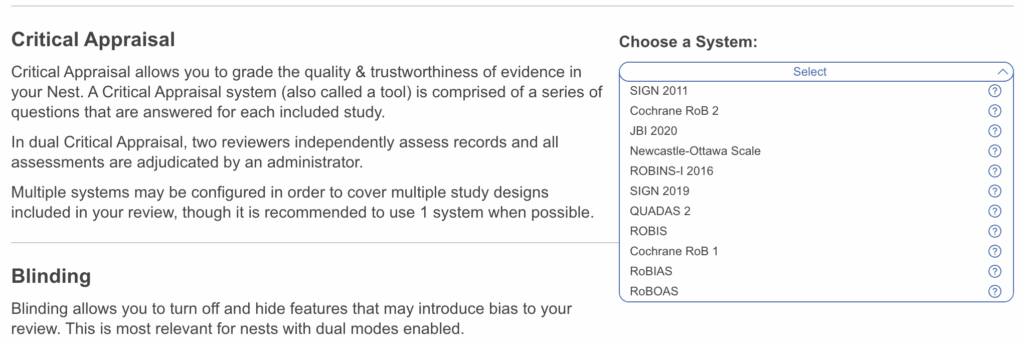
You can work in Single mode or, for greater reproducibility, Dual mode — two reviewers appraise independently and their judgments are reconciled, reducing the influence of any single reviewer’s interpretation. Configure this here.
3. Set the scope of appraisal #
Risk of bias isn’t always a property of the whole study — it can vary by outcome. A trial might be at low risk for an objectively measured primary endpoint but higher risk for a subjective secondary one, or carry outcome-specific missing data. Outcome-level tools such as RoB 2 and ROBINS-I are built around precisely this distinction.
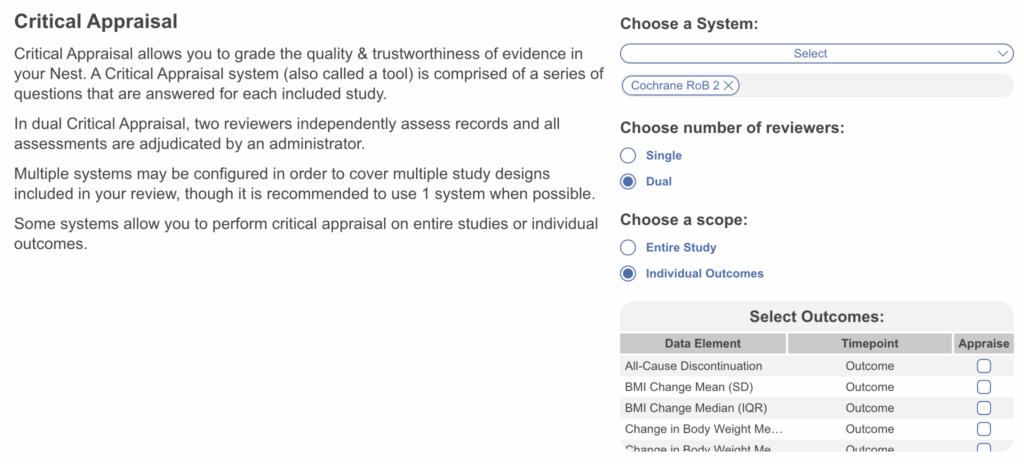
That’s why Scope lets you appraise either the Entire Study or specific outcomes:
- If you have not configured data elements for MA Extraction, leave the scope as Entire Study.
- If you have configured outcomes and want to appraise them individually, they’ll appear here for selection.
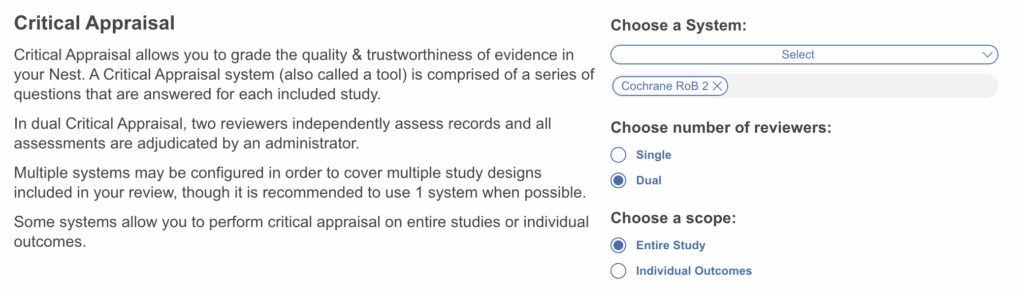
vs
4. Perform the appraisal #
Critical Appraisal is unique in that no other configuration is needed once your system and scope are set. Head to the Critical Appraisal module and reviewers can begin. Only included studies appear in this module — appraisal applies to the evidence that made it through screening. If multiple systems are configured they’ll be displayed as selectable tabs on the right-hand side under “Critical Appraisal”.
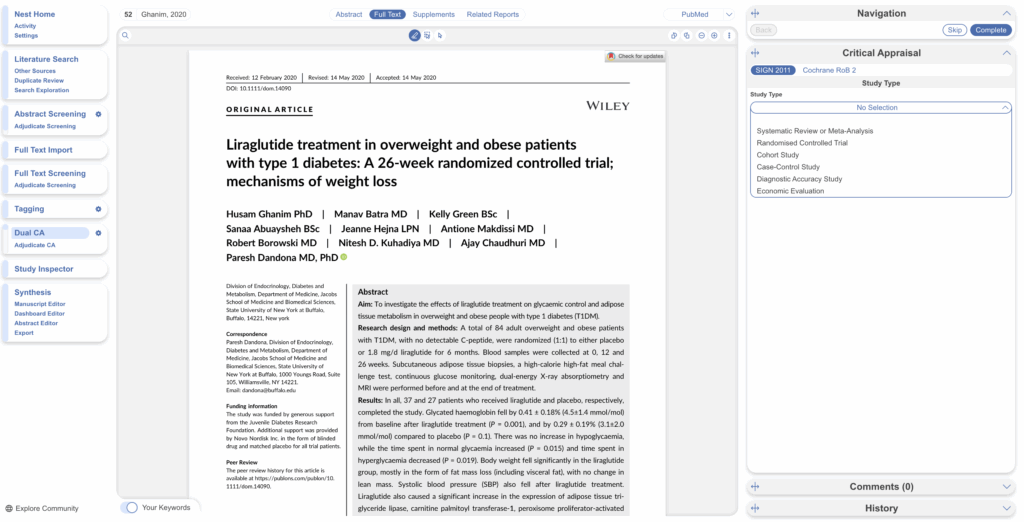
Read the study and select its study type. The exact questions depend on the system you chose, but every study within that system is assessed against the same question set — keeping judgments consistent and comparable across your review.
Assess bias. Work through the questions as you read the full text, answers auto-save. You can monitor your progress, skip a study and return to it later, and leave comments to record the reasoning behind a judgment — valuable for transparency, and for resolving disagreements in dual review.
5. Turn appraisals into reporting outputs #
Completing critical appraisal automatically generates Critical Appraisal visuals on Synthesis:
- Stoplight (traffic-light) diagrams — per-study, per-domain judgments at a glance, so readers can see exactly where each study’s risk sits.
- Domain Distribution — the spread of judgments across all studies, summarizing the quality of your evidence base as a whole.
Both are standard figures for a PRISMA-aligned manuscript. You can also export the full appraisal dataset as a spreadsheet from Inspector for further analysis.
6. Speed it up with Smart Critical Appraisal #
Smart Critical Appraisal (SCA) can pre-fill appraisal judgments from full-text PDFs, with a human reviewer always keeping the final call. SCA annotates its reasoning and never overwrites answers a human has already made. It is compatible with all systems offered.
→ See the dedicated Smart Critical Appraisal page for setup, supported systems, generation limits, and how to review SCA output.