

Critical appraisal is one of the most rigorous time-consuming stages of a systematic review. Smart Critical Appraisal (SCA) reduces that burden by reading the full text of your included studies, recommending answers to your chosen appraisal checklist, and showing you the passage behind each recommendation.
This gives each reviewer a faster starting point and a clear evidence trail, so the time you spend is spent on judgment rather than on hunting through PDFs for the relevant sentence.
New to critical appraisal in AutoLit? Start with the Critical Appraisal: Overview, which covers choosing a system, scope, and how appraisal feeds your synthesis.
1. What Smart Critical Appraisal does #
For every included study, SCA works through the questions in your selected appraisal system and, for each one:
- Recommends a response based on the study’s full text.
- Annotates its reasoning — highlighting the passage(s) that support the recommendation, so you can verify it at a glance rather than re-reading the whole article.
SCA is decision-support, not a replacement for expert review. Some appraisal questions turn on methodological judgment that can’t be read directly off the page, and agreement with expert reviewers varies by framework and by how clearly a study reports its methods. That’s exactly why every recommendation is presented for your review before it counts.
2. Before you begin #
Two conditions need to be in place:
- A critical appraisal system is selected. SCA works across all appraisal systems offered in AutoLit. Choose yours in Nest Settings — see the overview for guidance on matching a system to your study designs.
- Your included studies have full-text PDFs uploaded. SCA reviews full texts only — it does not appraise from abstracts, because a reliable appraisal has to be grounded in the complete study record. Studies without an uploaded full text are skipped. (See Bulk Import Full Texts to add them in batch.)
3. Generate Smart Appraisals #
From the Critical Appraisal module, select the gear icon to open the configuration settings and select Smart Critical Appraisal to generate recommended answers for your current system(s).
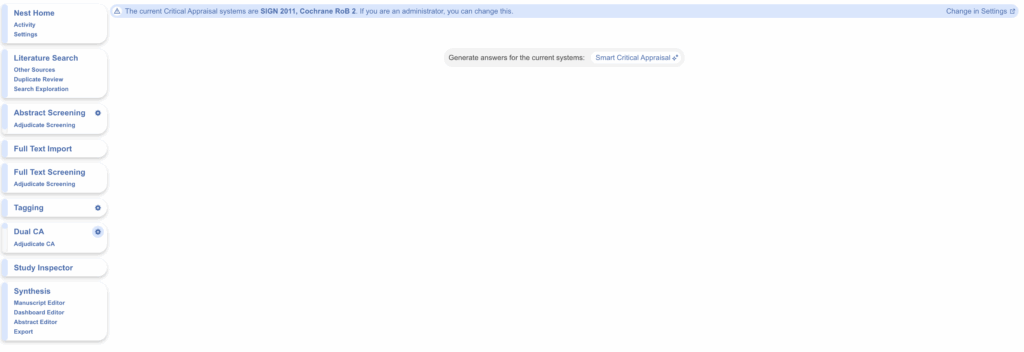
Once selected, a modal will appear. Before you commit any generations, SCA shows a short summary of what it’s about to do. It’s worth reading — each line tells you something about how the run will behave:
- “…generate appraisals for studies that don’t yet have responses.” If you have existing answers in a study — human or previously generated — the AI will not override nor fill any blank questions. Only when the entire study has been untouched will SCA fill in responses.
- “This nest’s configured tool(s) are: …” A checkpoint confirming which appraisal systems are enabled in Nest Settings. If a system you expected is missing (or one you didn’t intend is listed), fix it here before spending generations.
- “The appropriate tool will be automatically selected based on each study’s design.” When more than one system is configured, you don’t have to sort studies by hand. SCA matches each study to the right tool for its design based on the full text — for example, a randomised trial to Cochrane RoB 2 and a non-randomised study to SIGN 2011 — applying the same match-the-tool-to-the-design principle described in the overview.
- “Final” vs “Reviewer-level.” SCA works in both Single and Dual Critical Appraisal workflows. Run it in Dual mode when you want recommendations generated at either the reviewer or the final (reconciliation) level, preserving the independent-review structure that makes dual appraisal more reproducible. Only final level decisions are available in Single mode.
- “Only included studies with an uploaded full text qualify.” A final reminder that excluded records and studies without a full-text PDF are skipped — appraisal is always grounded in the complete study record.
- The “Overall” judgment is yours to claim. You can skip Overall generation when you’d rather make that call yourself, against your review’s own standards. If you don’t skip it, SCA will reach an overall judgment based on typical practice. Because the overall rating often reflects thresholds specific to your review, many teams prefer to set it themselves.
This will confirm which system(s) you have configured in your nest. If multiple systems have been selected, the AI will assess the study design of each record and determine which is appropriate.
Select Generate to begin. Each nest includes 1,000 full-text generations.
4. Review and finalise #
SCA’s value comes from the review step, not the generation step. Best practice is to read each recommended answer alongside its annotation before accepting it — the annotation tells you whether the recommendation rests on solid textual evidence or on a thin or ambiguous passage.
After SCA has finished running, use either the main Critical Appraisal page or Study Inspector to view the appraised studies. Questions, answers and any comments are displayed on the right-hand side.
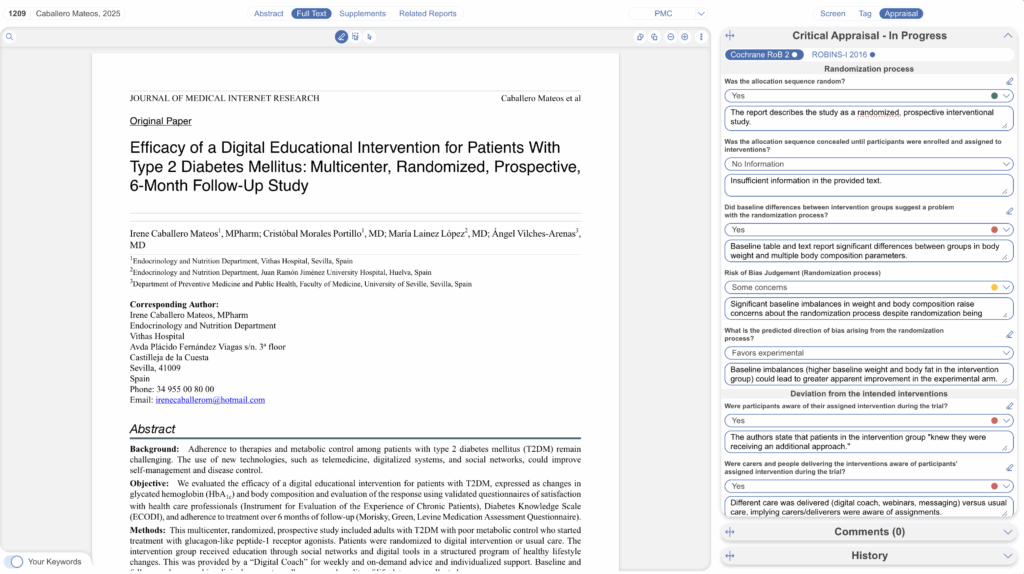
For every recommendation you can accept, revise, or clear it. To view the annotation, select the highlighter icon above the individual question, and select the first annotation (labelled “1”). This will guide you to the section of the full text used to answer this question. Here you can make edits to the existing annotation by re-highlighting the pdf, or “Add New” annotation.
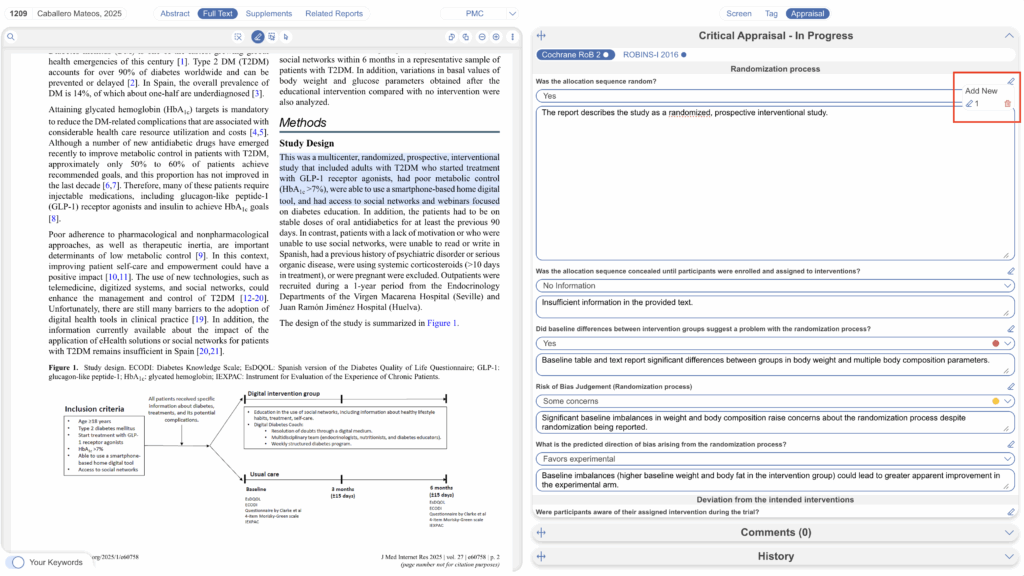
Everything SCA produces can also be done manually by a human reviewer — it simply gives you a faster first pass with the evidence already located.
5. How it works, and how far to trust it #
SCA is built on a large language model that evaluates each checklist question against the extracted full text of the study, one question and one document at a time, and returns a structured response with passage-level annotations. Those annotations exist to keep the process auditable — you can always trace a recommendation back to the source text for publication, regulatory review, or internal QA.
A few points worth being transparent about with reviewers and clients:
- Performance varies by framework and reporting quality. Agreement with expert reviewers is moderate overall and stronger where checklist criteria map closely onto explicit statements in the text. Treat lower-agreement frameworks with extra scrutiny.
- Output quality depends on the PDF. Poorly structured or scanned full texts can reduce the quality of the supporting evidence SCA can find.
- Your documents aren’t used to train the model. Full texts are processed transiently for appraisal generation and are not retained beyond the workflow.
For the full picture — intended use, validation metrics, and limitations — see the Smart Critical Appraisal model card, the Validation Studies page, and our Disclosure of AI Systems.