
Before you process or share a full text e.g. running an AI tool over it, printing it, or passing it to a colleague, you often need to know what you’re actually licensed to do with it. The Copyright Clearance Center (CCC) RightFind integration answers that question by surfacing Usage Rights on your records: for each full text, whether you’re permitted to use it for Print, Digital Use, AI/ML Use, and Reactive Sharing.
This matters most for the AI/ML Use right, which tells you whether you’re licensed to run Nested Knowledge’s AI tools, such as Adaptive Smart Tags and Smart Insights, over a given full text. For regulated evidence work, Usage Rights let you confirm it up front and filter your records accordingly.
The RightFind integration is available to any organization with a CCC RightFind license and covers usage rights only. It isn’t a full-text retrieval method (see Article Galaxy below or Full Text Import for retrieval).
Usage Rights is broader than RightFind. RightFind is the current source of usage-rights data but support for usage rights from additional data sources is continually being introduced.
Connecting RightFind #
In Organization Management → Integrations, find the RightFind panel and enter your Username, Password, and Country, then select Save. If you have issues, let us know at support@nested-knowledge.com.

The four usage rights and where they appear #
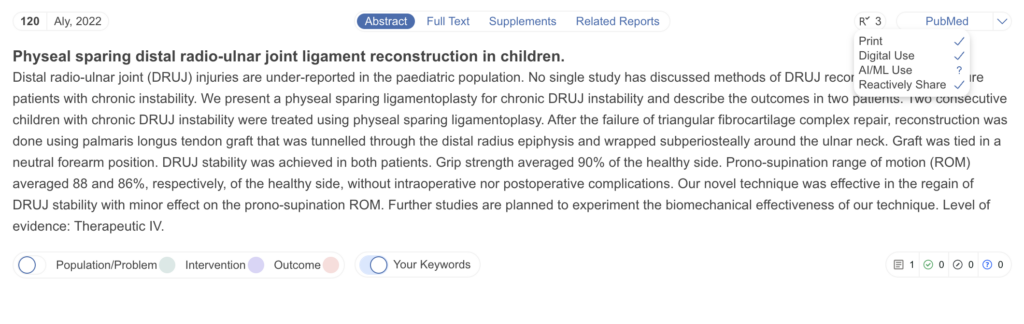
Once connected, usage rights are retrieved for your records and become available to view and filter. On a study, select the R icon (in the record header, alongside Abstract / Full Text / Supplements) to see the rights held for that full text, shown against its source:
- Print — permission to print the article.
- Digital Use — permission to use the article digitally.
- AI/ML Use — permission to process the article with AI/ML tools, including Nested Knowledge’s AI features.
- Reactive Sharing — permission to share the article on request.
Each right is marked as granted, denied, or unknown for the record.
Filtering records by usage rights #
In Study Inspector, the Usage Rights filter lets you narrow to records by a specific right and its status. Choose the usage (for example, AI/ML Use) and the right — Grant, Deny, or Unknown — to isolate every record you’re licensed to process with AI before running an AI tool over your included studies. You can also filter directly to ineligible records via the Usage Rights Ineligibility filter.