

Dual Criteria-Based Screening combines two of Nested Knowledge’s quality-control approaches in a single workflow: the structured, question-based rigor of Criteria-Based Screening and the independent double review of Dual Screening. Two reviewers independently answer your inclusion criteria and submit a screening decision for each record, and an Administrator then adjudicates to set the final determination.
This mode is ideal for protocol-driven reviews where you need both traceability (every decision backed by explicit criteria answers) and interrater quality control (every record screened twice, with disagreements resolved by an adjudicator).
How Dual CBS Differs from Dual Exclusion-Based Screening #
If you have used Dual Screening in its default, exclusion reason–based configuration, the reviewer experience here will feel familiar: each record is queued to reviewers until two screening decisions are made, then sent forward for adjudication. The difference is what is captured along the way. In Dual CBS, each reviewer answers the Yes/No criteria before submitting their decision, and those criteria answers are tracked per user alongside the screening decision itself. This means adjudicators — and your exports — can see not just what each reviewer decided, but how they answered each criterion in reaching that decision.
Note that a record only enters the adjudication queue once a reviewer submits a final screening decision (Include, Exclude, or Advance). Answering criteria alone, without submitting a decision, does not send those answers forward for adjudication.
1. Enable Dual Criteria-Based Screening #
Navigate to Settings under Nest Home and scroll to the Screening section. Select the Dual screening mode and ensure the Criteria toggle is on. With both configured, an Adjudicate Screening option appears in the Nest Menu for all Admins.
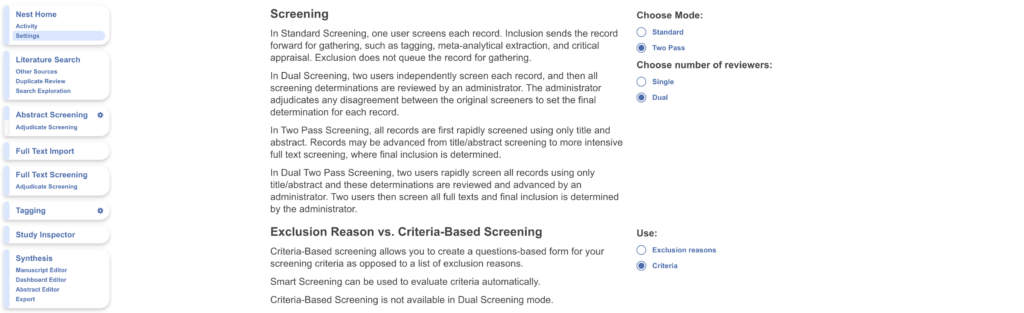
Warning: switching away from Dual Screening will only preserve final adjudicated decisions; records without an adjudicated decision revert to Unscreened and individual reviewers’ data will be lost.
2. Configure Your Criteria #
Criteria configuration works exactly as it does in single-reviewer CBS: create Yes/No questions for Abstract and Full Text screening, where Yes indicates inclusion, either manually or with Smart Config: Screening. All reviewers are shown the same criteria. See Criteria-Based Screening for full configuration guidance.
3. Screen Each Study Twice #
Head to Screening, where records are automatically queued to reviewers until two screening decisions are made. For each record, answer the criteria questions in the right-hand panel — the criteria met count keeps a running tally — then submit a final decision of Include/Advance or Exclude for a specific reason.
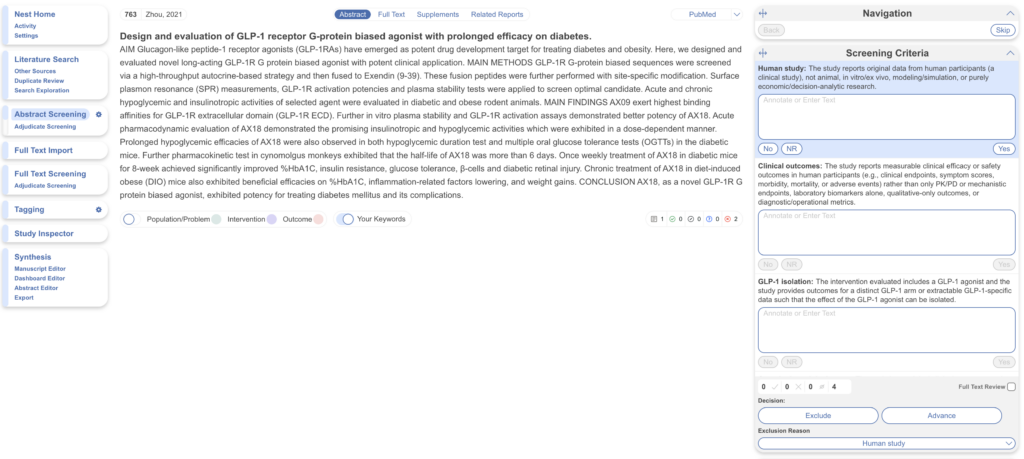
Your criteria answers and screening decision are recorded under your name, independently of the other reviewer. As in all Dual modes, the other reviewer’s decisions are hidden from you while you screen.
4. Adjudicate Disagreements #
Once a record has two screening decisions, it appears in the Adjudicate Screening queue. The adjudication interface displays each reviewer’s criteria answers alongside their screening decision, so the adjudicator can see exactly where reviewers diverged — whether on a single criterion, or on the final decision drawn from the same answers. If you have used Dual Critical Appraisal, the layout will look familiar.
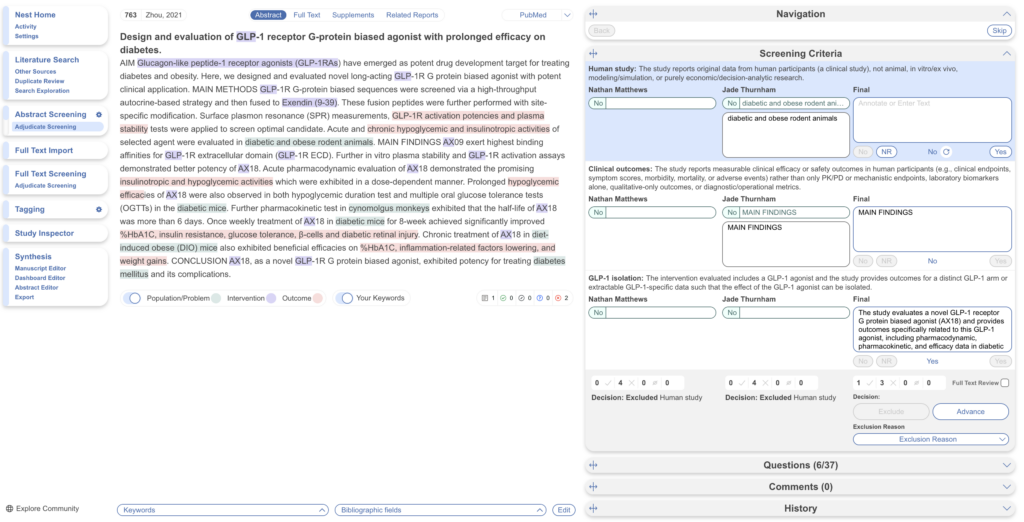
The adjudicator answers the Final Criteria themselves and selects the record’s final screening decision (advanced, included, or excluded depending on screening stage).
In the instance the final reviewer/adjudicator answers the criteria questions for each record but not the final screening decision for each record, you may apply a threshold. On the Configure Screening page, select Threshold. Select the number of criteria you wish to be satisfied and the decision you’d like to apply. This is only done at the final screening stage for either Abstract or Full Text Screening in Dual CBS.
Reviewing Results in Study Inspector #
All decisions can be filtered and reviewed in Study Inspector. The Screening Export from Inspector includes each reviewer’s criteria responses in addition to their screening decisions, giving you a complete, per-user audit trail of the screening process.
Smart Screener and Auto-Adjudication Availability #
Dual CBS currently supports manual screening only. Smart Screener support for Dual modes is in active development and coming soon, as is Auto-Adjudication for records where both reviewers agree. In the meantime, all records must be screened by two human reviewers and adjudicated manually.